AI GIF generator
Describe a character, mascot or product and how it moves. GPT Image 2.6 draws six frames and your browser loops them into a GIF you can download. Free to try: new accounts get 100 credits with no card, and you sign in with Google to generate.
Example made with GPT Image 2.6
9 credits
Cat barista
A round orange cat barista in a green apron pours latte art, lifts the cup and winks, soft 3D toy style
AI GIF examples
Real outputs with the model and prompt used. Start from any of them.
- GPT Image 2.6
Cat barista
9 creditsA round orange cat barista in a green apron pours latte art, lifts the cup and winks, soft 3D toy style
 GPT Image 2.6
Dinosaur mascot
9 creditsA tiny green dinosaur mascot waves hello, then hops with joy, soft 3D toy style
 GPT Image 2.6
Pixel knight
9 creditsA pixel art knight swings a sword and returns to a ready stance, retro 16 bit game style, plain dark blue background
Models for ai gif
2 models can run this tool. Switch between them in the generator without leaving the page.
How it works
- 01
Describe the motion
One subject and one simple action that ends where it started, such as a wave, a jump or a wink.
- 02
Pick a model and quality
GPT Image 2.6 is the fast default. Sunburst keeps the subject steadier across frames.
- 03
Set the speed and download
The GIF plays as soon as the frames land. Change the speed for free, then download the GIF or the sprite sheet.
AI GIF pricing
You pay per result in credits, priced by model and settings. The exact cost shows next to the generate button, and failed jobs are refunded automatically.
See credit packs and plans- Cheapest model
- 8 credits
- Free on sign up
- 100 credits
More AI tools


AI GIF questions
How does the AI GIF generator work?
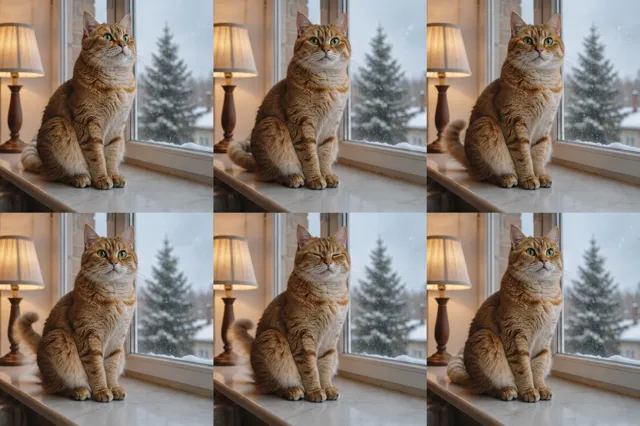
GPT Image 2.6 draws six frames of your animation in one image, a 3 by 2 sprite sheet, which is how OpenAI makes GIFs with Images 2.6. Your browser then cuts the sheet into frames and loops them as a GIF.
What prompts make the best GIFs?
One subject doing one short action that returns to the start: waving, jumping, blinking, cheering or a product turning. Name the style, such as pixel art, 3D toy or flat cartoon.
Can I change the speed of the GIF?
Yes. Switch between slow, normal and fast after the frames land. The GIF is rebuilt in your browser, so it costs no extra credits.
How big is the GIF?
Each frame is 512 by 512 pixels, six frames looping forever. That suits stickers, reactions, chat apps and social posts.
Can I turn my own photo into a GIF?
Yes. Use image to GIF: upload a photo or drawing, describe the motion, and the same model animates your subject.
How much does one GIF cost?
One GIF is one GPT Image 2.6 image, so the price depends on the model and quality you pick. The exact credit cost shows before you generate.
Is the ai gif generator free?
Yes, you can start for free. New accounts get 100 credits with no card, and you get 10 more each day you sign in while your balance is under 50. Larger jobs use paid credits.
Do I need to sign up?
You need a free account to generate, and signing in with Google takes one click. You can browse examples and see the credit price without an account.
How long does a generation take?
Most images finish in under a minute.
What happens if a generation fails?
You get the credits back. If a job fails, times out or is blocked by moderation, the credits return to your balance automatically.
Can I use the results commercially?
Yes. Files you generate with purchased credits can be used commercially, within each model provider's terms and our content policy.
Are my uploads and results private?
Yes. Uploads and results are private to your account. Results are kept for 30 days and uploads for 7 days, so download what you want to keep.
What files can I upload?
JPG, PNG or WebP images up to 10 MB. Tools that take reference clips or audio also accept MP4 or MOV video up to 50 MB and MP3 or WAV audio up to 20 MB.
Can I run several generations at once?
Yes, up to 4 at a time. Each one shows its own progress, and finished results are saved to My creations.
Do I need an API key or another subscription?
No. Every model runs in the browser on one FrameMux credit balance, with no API key and no separate subscription.